Write Math Faster: LaTeX Autocomplete and Live Preview for Equations in Your Notes
Stop memorizing LaTeX commands and counting braces. See how autocomplete, symbol completion, and live preview help students, engineers, and researchers write complex equations in minutes with Tekno Notebook.
The Real Cost of Typing Equations by Hand
Most of the effort in math notes goes into syntax, not mathematics.
Consider how much text sits behind a single formula. A Fourier transform, a Maxwell equation, or a nested summation can take dozens of characters of commands, braces, and subscripts. Forget one closing brace, misspell a command, or skip a parenthesis, and the whole expression breaks. You often only find out later, and then you hunt for the mistake while the lecture moves on.
That friction is why many students avoid typeset math until they are forced to use it. The fix is not to memorize more commands. It is to let the editor do the remembering. In Tekno Notebook, autocomplete, symbol and expression completion, and live preview work together, so you can concentrate on the mathematics and let the tool handle the syntax.
Three Ways Autocomplete Changes Math Note-Taking
1. Complete Symbols and Commands as You Type
Greek letters, operators, relations, and arrows all have command names that are easy to half-remember. Instead of opening a symbol table or a cheat sheet in another tab, you start typing a command such as \alpha or \leq and choose from the suggestions. You make fewer typos, and because you see the correct names again and again, you learn them without trying.
2. Complete Whole Expressions, Not Just Single Words
Fractions, roots, sums, integrals, and matrices are not single symbols; they are structures with several slots that must be balanced. Expression completion helps you build those structures quickly instead of typing every brace from scratch. Take a classic result: the sum of the first n integers.
\sum_{k=1}^{n} k = \frac{n(n+1)}{2}Even this short line needs a subscript, a superscript, a fraction, and nested parentheses. Completion reduces manual entry, so your attention stays on what the formula means rather than on counting braces.
3. Catch Mistakes While They Are Still Cheap
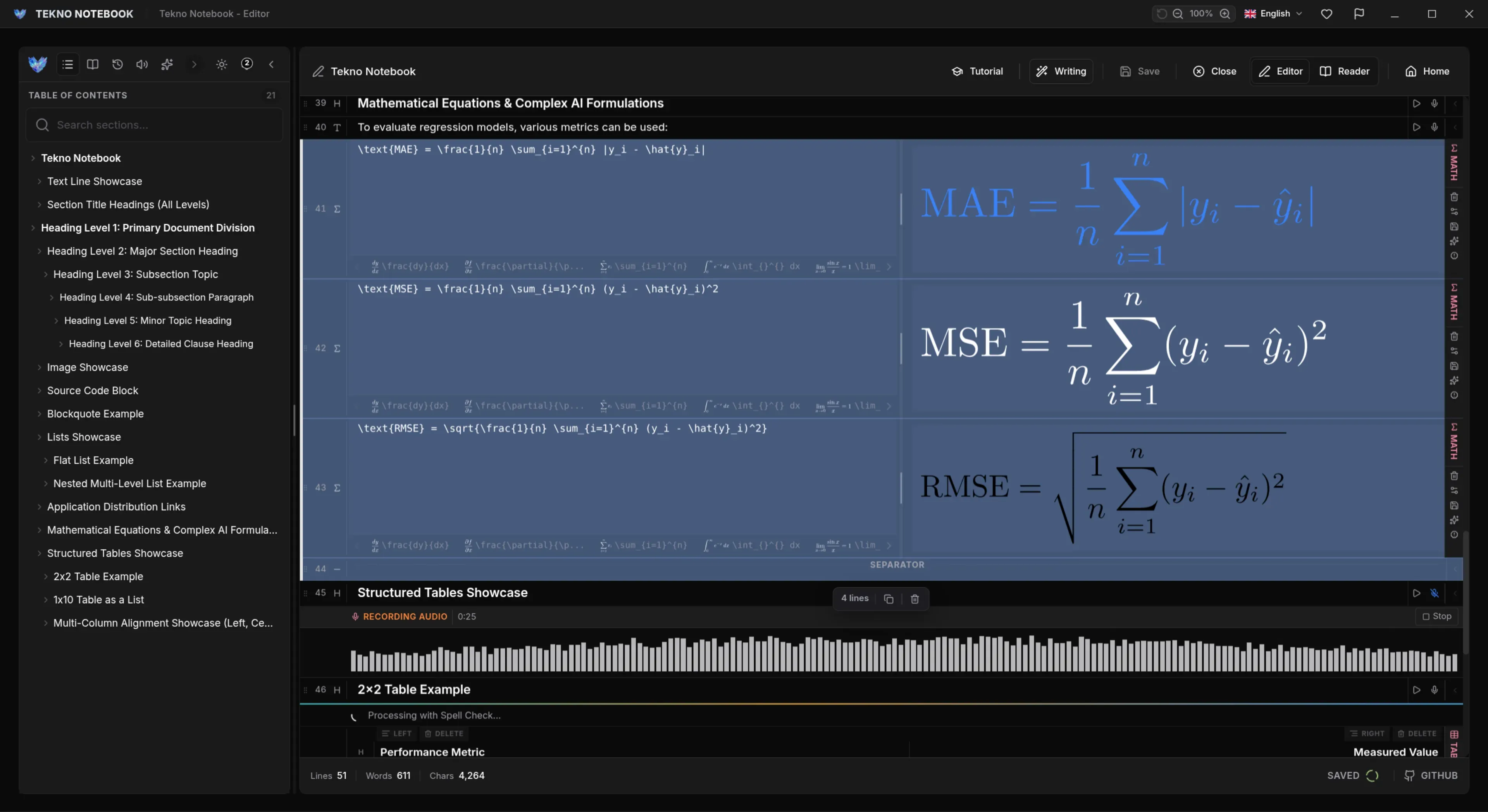
With live preview, every equation is rendered as you write it. A missing brace or a wrong symbol shows up immediately, while the idea is still fresh in your head, not after a compile cycle or at the end of the lecture. Combined with autocomplete, this shortens the loop between thinking, typing, and checking to a few seconds.
Keep Complex Formulas Organized
Habits that turn a pile of equations into notes you can actually reuse.
- One step per line: Write derivations step by step instead of cramming everything into one long expression.
- Align the equals signs: Line up each step so the reasoning is easy to follow.
- Name your results: Put a short heading above key formulas, such as the theorem or law they represent.
- Define your symbols: Add a plain-language line explaining what each variable means.
- Group by topic: Use headings so related formulas stay together and are quick to find later.
The best math note is the one you can still follow six months later.
A Derivation Written for Humans
Here is the quadratic formula derived by completing the square. Each line is one logical step, and the aligned equals signs make the reasoning readable at a glance:
\begin{aligned}
ax^2 + bx + c &= 0 \\
x^2 + \frac{b}{a}x &= -\frac{c}{a} \\
\left(x + \frac{b}{2a}\right)^2 &= \frac{b^2 - 4ac}{4a^2} \\
x &= \frac{-b \pm \sqrt{b^2 - 4ac}}{2a}
\end{aligned}
Who Benefits from Faster Equation Entry
Students capture lecture formulas and problem-set steps without falling behind. Engineers document design calculations and signal-processing formulas next to their reasoning. Researchers draft the mathematics of a paper before it ever reaches a journal template. Teachers prepare worked examples. Anyone who works with mathematics regularly gains time, accuracy, and clearer notes.
Explore the Tekno Notebook project page (/en/project/TeknoNotebook), follow our step-by-step LaTeX note-taking workflow (/en/blog/take-math-and-science-notes-with-latex-tekno-notebook), or see how to turn finished notes into PDF and LaTeX documents (/en/blog/export-notes-to-pdf-and-latex-arabic-rtl-support).

Tekno Notebook
Type Less, See More: Equations Without the Friction
A free desktop notebook with equation autocomplete, symbol and expression completion, and live preview, so complex formulas take minutes instead of a fight with syntax. Organize derivations alongside your notes in an offline, privacy-first workspace.
- Autocomplete for LaTeX commands and math expressions
- Symbol and expression completion that reduces manual typing
- Live preview that shows each equation as you write it
- Clear organization for complex formulas and multi-step derivations